API
Additionally, the common API of a module is available.
Methods
loadView3d()
Asynchronous method that loads a specific 3d view from a venue.
Input:
load_options(object): Object with the information of the 3d view to be loaded. Its properties are:venue_id(string): venue id.view_id(string): view id. It is usually a seat id or a section id, and the ids, in general, match those found inmap_viewermaps.reset_camera_rotation(boolean) [optional]: resets the camera rotation so the new view will be looking at the front.trueby default.falseis useful in some plugins, like navigation plugin.description(object) [optional]: accessible description for the view, applied while it loads. Same shape asaccessibility.setCurrentViewDescriptioninput:{ label, description, language }. Fields you omit fall back to the view's default description. See Describe the map or view at load time.
Output:
promise(Promise): loadView3d returns a promise that will be resolved if the 3d view is loaded successfully, or it will be rejected if there was a problem when loading the 3d view.- If the promise is resolved successfully, the first argument will be an object with the
property
instance, with the reference to the module. - If the promise is rejected, the first argument will be an error with a property
instancewith the module instance that failed to load.
- If the promise is resolved successfully, the first argument will be an object with the
property
Warning
This method is asynchronous.
Example:
has3dViews()
Asynchronous method that checks if a venue has 3d views material.
Input:
venue_id(string): venue id.
Output:
promise(Promise): returns a promise that will be resolved with a boolean, beingtrueif the venue has 3d views, orfalseif it does not. The promises will be rejected if there is another problem, for example if you do not have permissions to access this venue, regardless of whether the view exists or not.
Warning
This method might generate a 403 error in console if the view does not exist. This error message cannot be prevented to be shown in console, but is harmless and no javascript error is thrown.
Warning
This method is asynchronous.
Example:
has3dView()
Asynchronous method that checks if a specific 3d view exists.
Input:
options(object): Object with the information of the 3d view to be checked. Its properties are:venue_id(string): venue id.view_id(string): view id. It is usually a seat id or a section id, and the ids, in general, match those found on a map.
Output:
promise(Promise): returns a promise that will be resolved with a boolean, beingtrueif the 3d view exists, orfalseif it does not. The promises will be rejected if there is another problem, for example if you do not have permissions to access this venue, regardless of whether the view exists or not.
Warning
This method might generate a 403 error in console if the view does not exist. This error message cannot be prevented to be shown in console, but is harmless and no javascript error is thrown.
Warning
This method is asynchronous.
Example:
checkView3d()
Warning
Deprecated. Use has3dView instead.
getPreview()

Asynchronous method that returns the preview image of a 3d view. The image comes with its alt and lang
attributes filled from the view's accessible description.
Warning
Not all venues have 3d panoramic views: the promise rejects when the view does not exist or the image fails to
load. With url: true the image itself is not downloaded, so a missing image only surfaces when you load the url.
Input:
options(object): Object with the information of the preview to be downloaded. Its properties are:venue_id(string): venue id.view_id(string): view id. It is usually a seat id or a section id, and the ids, in general, match those found inmap_viewermaps.url(boolean) [optional]:trueto resolve to the image url instead of an image.falseby default.variant_id(string) [optional]: id of a preview variant defined for the venue. When the venue does not define it, the default preview is returned.
Output:
promise(Promise): resolves to anHTMLImageElement, or to the image url whenurlistrue.
Example:
getThumbnail()
Warning
Deprecated since 3d-viewer@1.7.0. Use getPreview() instead.
Asynchronous method that returns an image with a preview of the 3d view.
Warning
Not all venues have 3d panoramic views, so you might get an error if the image does not exist.
Input:
options(object): Object with the information of the preview to be downloaded. Its properties are:venue_id(string): venue id.view_id(string): view id. It is usually a seat id or a section id, and the ids, in general, match those found inmap_viewermaps.
url(boolean) [optional]:trueif you want that the promise to be resolved in a url,falsewill be resolved in an image.falseby default.
Output:
promise(Promise): If the image is downloaded successfully, thePromiseresolves with the image. If the flag url isfalseit is resolved in an url.
Example:
isInitialized()
Returns true if the module has been initialized.
Output:
initialized(boolean):trueif it has been initialized,falseotherwise.
Example:
isLoaded()
Returns true if there is a 3d view currently loaded.
Output:
loaded(boolean):trueif a 3d view is completely loaded,falseotherwise.
Example:
reset()
Asynchronous method that unloads the current 3d view (if any). It is necessary to call loadView3d again after this.
Waiting for the returned promise is optional. Calling loadView3d right after reset()
keeps working: the viewer runs the unload before the new load either way.
Output:
promise(Promise): Resolves once the previous view has been unloaded and its resources released. It never rejects.
Example:
recoverContext()
Recovers the viewer after a lost WebGL context by reloading the current view. Use it when the
auto_recover_context flag is off, or when automatic recovery did not run.
Output:
promise(Promise): Resolves totrueif the view was recovered, orfalseif there was nothing to recover.
Example:
subscribe()
Allows the subscription to callbacks. This is the same as passing the callbacks when loading the module.
Input:
callback_name(string): Any callback of the list.callback_func(function): Function that will be called when triggered.
Example:
unsubscribe()
Removes a callback previously added with subscribe method or loading the module.
Input:
callback_name(string): Any callback of the list.callback_func(function): reference to the function to be removed.
Example:
getViewDescription()
Warning
Deprecated since 3d-viewer@1.7.0. Use
viewer.accessibility.getRemoteViewDescription(),
which takes the same input and behaves the same way. To read the description currently in effect,
including your own overrides, use
viewer.accessibility.getCurrentViewDescription().
Allows to override the current view description of the current view. Used to fill ARIA attributes (Accessible Rich Internet Applications). You can check more about accessibility here.
Input:
options(object) [optional]:trueOptional object with the information of the 3d view to get its description. If no input is passed, it will get the description of the current loaded view (if any). Its properties are:venue_id(string)view_id(string)
Output:
description(Promise): promise that will be resolved with an object with "title", "description" and "language".
Example:
setCurrentViewDescription()

Warning
Deprecated since 3d-viewer@1.7.0. Use the synchronous
viewer.accessibility.setCurrentViewDescription() instead.
Allows to override the current view description of the current view. Used to fill ARIA attributes (Accessible Rich Internet Applications). You can check more about accessibility here.
Input:
obj(object) [optional]: Object with the following optional properties:title(string) [optional]: Title for the current view.description(string) [optional]: Description for the current view.language(string) [optional]: Language for the current view. It should be a valid language code.
Example:
open()
Appends the 3d viewer to the DOM.
Example:
close()
Detaches the 3d viewer from the DOM.
Example:
getVenueId()
Returns the id of the current loaded venue.
Output:
current_venue(string|null): returns the id of the current loaded venue. If there is no venue loaded yet, it will returnnull.
Example:
getViewId()
Returns the id of the current loaded 3d view.
Output:
current_view(string|null): returns the id of the current loaded 3d view. If there is no view loaded yet, it will returnnull.
Example:
setContainer()
Changes the container where the 3d viewer is.
Input:
div_element(string | HTMLDivElement): if the input is a string, it must be the unique id of anHTMLDivElement. Otherwise, it must be theHTMLDivElementitself.
Example:
toggleFullscreen()
enables/disables full screen mode.
This method triggers the following callbacks:
fullscreen_enabledfullscreen_disabled
Warning
Due to browser security measures, this method should be called from an event triggered by the user. Otherwise, the browser could cancel the action.
Output:
promise(Promise): It will be resolved once the fullscreen request has been fulfilled. If the request fails, for example if the browser blocks the request because it has been requested outside a user event, it will be rejected.
Example:
rotateCamera()
Rotates the camera a certain angle.
Input:
spherical([number, number]):[theta, phi]rotation deltas in radians: theta rotates the camera horizontally, phi vertically.inertia(boolean?): the rotation will generate inertia if this istrue.falseby default.
setCameraRotation()
Sets the camera rotation to a specific angle, with no animation.
Input:
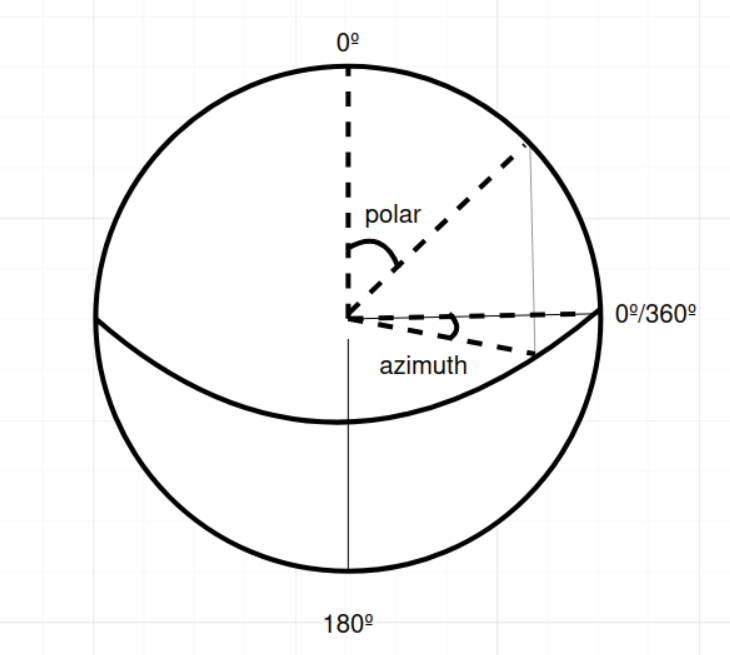
spherical([number, number]):[theta, phi]target angles in radians: theta is the horizontal angle (azimuth) and phi the vertical (polar) one. Angles are absolute in the scene, not relative to the view front.
Example:
getCameraRotation()
Returns the current camera rotation.
Input:
local(boolean?) = false:truereturns theta relative to the view front (0 at the front), the same frameazimuth_limituses.falseby default: angles absolute in the scene. Unrelated to thelocaloflookAt(), which refers to position coordinates.

Output:
spherical([number, number]):[theta, phi]in radians: theta is the horizontal angle (azimuth) and phi the vertical (polar) one.
Example:
lookAt()
Rotate the camera to look at the vec coords.
Input:
load_options(object): Object with the information of the map to be loaded. Its properties are:target([number, number, number] | Viewer3dNode): iftargetis a vector this indicate where the camera should look. If it's a node the camera will look at it.time(number?) = 0: time of the interpolation animation from the current camera rotationlocal(boolean?) = false:trueif the point is in local coordinates.falseby default. Ignored if target is not a node.
Input:
Warning
Deprecated input. Use the other input instead.
vec([number, number, number]): position to look at.time(number): how many ms should last the transition.local(boolean?): Is thevecinput in venue coords or relative to the pano.
Output:
look_at_promise(Promise): returns the transition promise to detect when it end. The promise will be rejected if the venue is not loaded or if the user interrupts the animation.
Example:
setPoweredByLabel
Allows to customize some options of the 'Powered by' label.
Input:
obj(object) [optional]: Object with the following optional properties:position(string) [optional]: Position of the label. Valid values are:"topleft""topright""topcenter""bottomleft""bottomright""bottomcenter"
offset([number, number]) [optional]: Offset[x, y]in pixels from the corners. Valid values go from[2, 2]to[50, 50].size(number) [optional]: Label font size. Valid numbers go from8to14.
Example:
setNoViewLabel
Allows to customize the 'View not available' message.
Input:
Object with the property text, which is the text to be shown when there is no view available.
Example:
Accessibility
The accessibility namespace groups the methods that read and write the accessible description of the
currently loaded view, and that push announcements to the screen-reader live region. You can check more
about accessibility here.
accessibility.getCurrentViewDescription()

Synchronous method that returns the accessible description of the currently loaded view. These properties are the ones used to fill the ARIA attributes (Accessible Rich Internet Applications) of the viewer. You can check more about accessibility here.
Warning
This method throws if there is no view loaded.
Output:
description(object): Object with the following properties:label(string): Accessible label of the current view.title(string) [deprecated]: Deprecated alias oflabel, populated with the same value.description(string) [optional]: Extended accessible description of the current view.language(string): Language code of the current view.
Example:
accessibility.getRemoteViewDescription(options)
Asynchronous method that resolves the default accessible description of a 3d view, read from the venue resources. Called without arguments it describes the loaded view; called with a view it describes that one, whether or not it is loaded. It does not load anything.
Use it to label a view before opening it, for example on a thumbnail or a navigation menu entry. It
returns the default description: overrides written with
accessibility.setCurrentViewDescription are not
included, read those with
accessibility.getCurrentViewDescription.
Input:
options(object) [optional]: the 3d view to describe. Without it, the currently loaded view is described. Its properties are:venue_id(string)view_id(string)
Output:
description(Promise): promise resolving to an object with the following properties:label(string): Accessible label of the view.title(string) [deprecated]: Deprecated alias oflabel, populated with the same value.description(string) [optional]: Extended accessible description of the view.language(string): Language code of the view.
The promise rejects when the requested view does not exist, and when no view is passed and none is loaded.
Example:
accessibility.setCurrentViewDescription(input)
Overrides the accessible description of the currently loaded view, updating the viewer aria-label,
aria-describedby and lang attributes. You can check more about accessibility here.
Warning
This method is silent: it updates the ARIA attributes but does not announce the change to the
screen reader. Pair it with announceStatusMessage if you
want the change to be spoken.
Input:
input(object) [optional]: Object with the following optional properties:label(string) [optional]: Accessible label for the current view.title(string) [deprecated]: Deprecated alias oflabel.description(string) [optional]: Extended accessible description for the current view.language(string) [optional]: Language for the current view. It should be a valid language code.
Example:
accessibility.announceStatusMessage(message)
Pushes a message to the polite live region (aria-live="polite") so the screen reader announces it. This
is the only public path to the live region, and is meant for transient status messages. The announcement is
unconditional: it is not gated by the automatic_announce_status_message
flag.
Input:
message(string): Text to be announced through the live region.
Example:
Properties
aspect_ratio
Changes or returns the 3d viewer aspect ratio. It only works if fixed_aspect_ratio is true.
Input/Output:
aspect_ratio(number): aspect ratio from the 3d viewer. The value is obtained by dividing height/width. For instance, to use a 16:9 aspect ratio, the division is9/16. This is set to9/16by default.
Example:
pixel_ratio
Sets the canvas pixel ratio. By default, it is set to the device pixel ratio.
Setting a value here will be ignored when automatic_pixel_ratio is true.
For more info check this.
Warning
Increasing this value may affect performance, while a lower pixel ratio than the current device may cause blurry images.
Input/Output:
pixel_ratio(number): pixel ratio.
Example:
fov
Changes or returns the 3d viewer field of view.
Input/Output:
fov(number): field of view of the camera, in degrees.
Example:
azimuth_limit

Changes or returns the spherical azimuth limit.
Input/Output:
[min, max]([number, number]): min and maximum azimuth (horizontal move), in degrees, relative to the view front (0 at the front).[-Infinity, Infinity]when the rotation is unrestricted.
Example:
polar_limit
Changes or returns the spherical polar limit.
Input/Output:
[min, max]([number, number]): min and maximum polar (vertical move), in degrees (up: 0, bottom: 180).
Example:
Flags
fixed_aspect_ratio
Info
You can set this flag when initializing process has finished (loadModule).
Specifies the rescaling mode of the 3d viewer.
- If
true: The 3d viewer will take up the 100% of the container width, and the height will be computed multiplying the width by theaspect_ratio. For instance, if aspect_ratio = 0.5, the height will be 500px when the Viewer container has width of 1000px. - If
false: The Viewer will take up the 100% of the container width and height. It is important to ensure that the container has some height or it will be set as 0px.aspect_ratiowill be ignored.
Input/Output:
fixed_aspect_ratio(boolean):trueenables the fixed_aspect_ratio mode.falsedisables it. This is set totrueby default.
Example:
show_fullscreen_button
Info
You can set this flag when initializing process has finished (loadModule).
show/hides fullscreen button.
- If
true: The 3d viewer will take up the 100% of the container width, and the height will be computed multiplying the width by theaspect_ratio. For instance, if aspect_ratio = 0.5, the height will be 500px when the Viewer container has width of 1000px. - If
false: The Viewer will take up the 100% of the container width and height. It is important to ensure that the container has some height or it will be set as 0px.aspect_ratiowill be ignored.
Input/Output:
show_fullscreen_button(boolean):trueshows the button.falsehides it. This is set totrueby default.
Example:
show_loading_screen
Info
You can set this flag when initializing process has finished (loadModule).
Enables/disables the loading screen while a view is loading.
- If
true: It will show a loading screen animation while loading. - If
false: no loading screen.
Input/Output:
show_loading_screen(boolean):trueenables the loading screen.falsedisables it. This is set totrueby default.
Example:
show_tutorial
Info
You can set this flag when initializing process has finished (loadModule).
Enables/disables the tutorial animation the first time a view is loaded.
- If
true: A tutorial animation with a predefined movement will be shown the first time a view is loaded. - If
false: No tutorial animation will be shown.
Input/Output:
show_tutorial(boolean):trueenables the tutorial.falsedisables it. This is set totrueby default.
Example:
keyboard_arrows_rotation
Info
You can set this flag when initializing process has finished (loadModule).
allows using the left/right keyboard arrows to rotate the camera when a view is loaded.
- If
true: left and right keyboard arrows will rotate the view. - If
false: disables keyboard arrow rotation.
Input/Output:
keyboard_arrows_rotation(boolean):trueenables arrow keys rotation.falsedisables arrow keys rotation. This is set totrueby default.
Example:
zooming
Info
You can set this flag when initializing process has finished (loadModule).
Enables or disables zooming with mouse or touch. Not all 3D views allow zooming, independently of the value of this flag.
- If
true: allows zooming on the 3d view (if the view allows it) with mouse scroll or pinch. - If
false: disables zooming on the view with scroll or pinch. You still can zoom in and out with interface buttons or other API methods. Disabling it will allow scrolling on the page over the view.
Input/Output:
zooming(boolean):trueenables zooming.falsedisables it. This is set totrueby default.
Example:
panning
Info
You can set this flag when initializing process has finished (loadModule).
Enables or disables panning with mouse or touch.
- If
true: allows panning with mouse or touch. - If
false: disables panning on the view when using mouse or touch. You still can move with interface buttons or other methods.
Input/Output:
panning(boolean):trueenables panning.falsedisables it. This is set totrueby default.
Example:
automatic_pixel_ratio
Info
You can set this flag when initializing process has finished (loadModule).
Automatically checks and sets the current devicePixelRatio
to pixel_ratio.
- If
true: The module will check and update the current pixel ratio to match the current device. AdevicePixelRatio. may change, for example, moving the browser window to another display with a different pixel ratio. Setting a value topixel_ratiowill be ignored. - If
false: the module will preserve the whateverpixel_ratiohas been set.
Input/Output:
panning(boolean):trueenables panning.falsedisables it. This is set totrueby default.
Example:
automatic_announce_status_message
Info
This flag lives on viewer3d.accessibility.flags.
Specifies if successful lifecycle changes are automatically announced through the screen-reader live region.
- If
true: every successfulloadView3d(andloadSpace3d) is automatically announced through the live region. The announced label is the resolved one, so adescriptionpassed in the load options is what gets spoken. - If
false: lifecycle announcements are suppressed. ManualannounceStatusMessagecalls still fire.
Input/Output:
automatic_announce_status_message(boolean):trueenables the automatic announcements.falsedisables them. This is set totrueby default.
Example:
outline_on_keyboard_focus
Info
This flag lives on viewer3d.accessibility.flags.
Specifies if the inset focus ring is drawn when the viewer receives keyboard or programmatic focus.
- If
true: the inset focus ring is drawn on keyboard / programmatic focus. - If
false: no focus ring is drawn on keyboard / programmatic focus.
Input/Output:
outline_on_keyboard_focus(boolean):trueenables the focus ring.falsedisables it. This is set totrueby default.
Example:
outline_on_mouse_focus
Info
This flag lives on viewer3d.accessibility.flags.
Specifies if the inset focus ring is drawn when the viewer receives pointer (click / tap) focus.
- If
true: the inset focus ring is drawn on pointer (click / tap) focus. - If
false: no focus ring is drawn on pointer focus.
Input/Output:
outline_on_mouse_focus(boolean):trueenables the focus ring on pointer focus.falsedisables it. This is set tofalseby default.
Example:
auto_recover_context
Controls automatic recovery after a lost WebGL context (GPU reset, tab backgrounding). When on, a lost
context is recovered by reloading the current view, as long as the number of live 3D viewers does not
exceed the context_recovery_budget option. Above that budget, or
with this flag off, recover manually with recoverContext().
- If
true: lost contexts auto-recover (within budget). This is the default. - If
false: lost contexts are not recovered automatically.
Input/Output:
auto_recover_context(boolean):trueenables automatic recovery.falsedisables it. This is set totrueby default.